7 Everyday Applications of UPS Systems: How Uninterruptible Power Supplies Protect Homes, Offices, and Small Businesses
Quick Answer: What Is a UPS Used for in Daily Life?
A UPS (Uninterruptible Power Supply) is used to keep essential devices running when utility power fails and to protect equipment from voltage dips, surges, and short interruptions. In everyday life, UPS systems are commonly used for:
- Home office computers and monitors
- Wi-Fi routers, modems, and home networking equipment
- Desktop PCs, gaming setups, and workstations
- Home security cameras and smart home hubs
- POS systems and payment devices in small shops
- NAS storage, mini servers, and local backup devices
- Selected household and communication equipment that must stay online during short outages
In simple terms, a UPS gives users a short but critical window to save work, complete transactions, keep communication online, and shut down equipment safely.
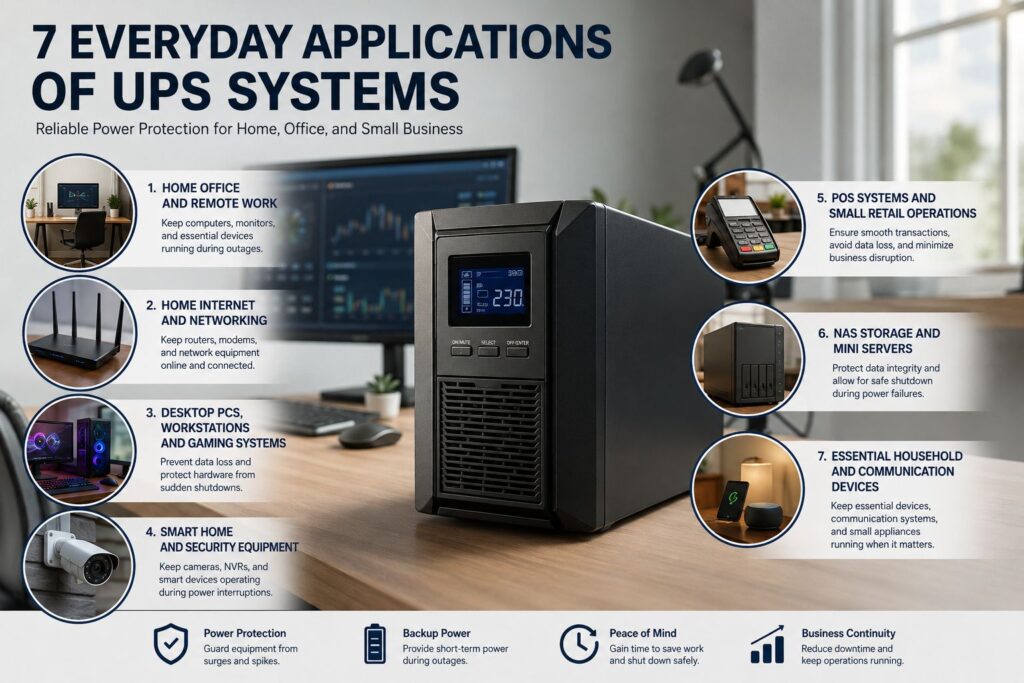
Why UPS Systems Matter Beyond Data Centers
Many people still associate UPS systems with server rooms and enterprise infrastructure. In reality, modern homes and small businesses now depend on electronics just as heavily as larger facilities. A single power event can interrupt online meetings, stop a point-of-sale terminal, disconnect a security camera recorder, or corrupt files stored on a NAS.
A UPS is valuable in daily use because it performs three important functions:
1. Instant Backup Power
When utility power fails, the UPS switches to battery power fast enough to keep connected equipment running without interruption.
2. Safe Shutdown Time
It gives users enough time to save files, complete a payment, close software correctly, or shut equipment down in an orderly way.
3. Basic Power Protection
Depending on the UPS topology, it can help stabilize voltage and reduce the impact of surges, sags, and short power disturbances.
7 Everyday Applications of UPS Systems
Below are the most common ways a UPS power supply is used in daily life. These examples cover both residential and light commercial applications where stable power matters but full generator systems are often unnecessary or impractical.
1. Home Office and Remote Work Setups
One of the most practical uses of a UPS is protecting a home office. Remote work has made desktop computers, monitors, internet equipment, and VoIP devices essential to daily operations. A sudden outage can instantly end a video call, shut down a workstation, or cause unsaved files to be lost.
A UPS helps keep key equipment running long enough for the user to save documents and shut down properly. Typical protected devices include:
- Desktop computers and monitors
- Fiber modems and Wi-Fi routers
- Docking stations and VoIP phones
- External storage or small NAS units
2. Home Internet, Routers, and Networking Equipment
In many households, the internet connection is now a core utility. Work calls, online learning, streaming, cloud storage access, and smart home systems all depend on powered networking devices. If the power goes out, the connection often disappears immediately because the router, modem, and ONT shut down.
A compact UPS for router and modem backup can keep the network online during short outages. This is especially useful for:
- Maintaining online meetings and classes
- Keeping mesh Wi-Fi systems active
- Preserving access to cloud documents and communication apps
- Supporting connected home devices that rely on internet access
3. Desktop PCs, Workstations, and Gaming Systems
High-performance desktop computers, creative workstations, and gaming systems can be sensitive to sudden power loss. A blackout in the middle of a file transfer, software update, video render, or game session may not only interrupt work but also create file corruption risks.
In this scenario, a UPS acts as a short-term protection layer for:
- Gaming PCs and consoles
- Video editing and design workstations
- Large displays and peripheral equipment
- Audio production or content creation setups
4. Smart Home Systems and Residential Security Equipment
Smart homes increasingly depend on devices that should remain online even during a short outage. These can include security cameras, NVR or DVR recorders, smart home hubs, automation controllers, door access devices, intercoms, and alarm panels.
Without backup power, these systems may stop the moment the grid fails, creating gaps in monitoring and interrupting automated functions. A UPS can keep selected security and control devices running long enough to cover short interruptions and maintain basic protection.
5. POS Systems, Cash Registers, and Small Retail Operations
In convenience stores, cafés, pharmacies, and small retail shops, a power interruption can directly affect revenue. If a POS terminal loses power mid-transaction, the result may be failed payments, incomplete receipts, lost order data, or unnecessary delays at checkout.
A UPS for small business applications is commonly used to protect:
- POS terminals and touchscreen ordering systems
- Receipt printers and barcode scanners
- Payment gateways and store routers
- Back-office PCs handling inventory or transactions
6. NAS Storage, Mini Servers, and Local Backup Devices
A growing number of households and small teams use NAS devices, mini servers, and local backup systems for file sharing, surveillance storage, media libraries, and business continuity. These devices are more vulnerable to abrupt shutdowns than simple household appliances because they may be writing data, syncing files, or rebuilding storage arrays when the power fails.
A UPS helps protect:
- Home NAS systems storing photos, videos, and work files
- Small office file servers
- Local backup appliances and surveillance storage
- Mini PCs used as lightweight business or automation servers
7. Essential Household and Communication Devices During Short Outages
A UPS is not a whole-house backup system, but it can still support selected essential devices during short outages. In residential use, this often includes communication and low-power electronics that people rely on every day.
Depending on UPS capacity and battery runtime, common examples include:
- Wi-Fi and communication devices
- Apartment intercom or access control equipment
- Small office printers or terminal devices
- Selected monitoring or low-power control equipment
- Basic lighting for a desk, service point, or network corner
What a UPS Does Well in Everyday Use
Across all of the applications above, the core value of a UPS remains the same: it helps users manage the moment of power failure rather than letting equipment shut off instantly.
Keeps Critical Loads Online
Even a few minutes of runtime can keep networking equipment, workstations, and POS systems functioning during a short outage.
Reduces Data Loss Risk
A UPS provides enough time to save files, finish active tasks, and shut down storage devices correctly.
Improves Equipment Protection
Many UPS systems also help protect electronics from short disturbances, unstable voltage, and sudden power drops.
What a UPS Does Not Replace
To choose the right power protection solution, it is important to understand what a UPS is designed to do and what it is not designed to do.
| Solution | Primary Purpose | Typical Use Case |
|---|---|---|
| UPS System | Short-term backup power and power protection | Computers, routers, POS, NAS, security equipment |
| Generator | Longer-duration backup power supply | Buildings, facilities, or large loads requiring extended runtime |
| Voltage Stabilizer | Voltage regulation without battery backup | Applications where stable voltage is needed but outage runtime is not required |
| Home Energy Storage System | Broader residential backup and energy management | Homes needing larger-scale backup for multiple household circuits |
How to Choose a UPS for Everyday Applications
If you are selecting a UPS for home, office, or small business use, the best approach is to start with the actual equipment you need to protect rather than choosing only by UPS capacity label.
1. Calculate the Real Load
List the devices you want to connect and estimate their total wattage. A router-only backup requirement is very different from a workstation, POS system, or small server load.
2. Define the Required Runtime
Decide whether you only need a few minutes for safe shutdown or whether you need longer runtime to keep the internet, security, or retail operations online during short utility interruptions.
3. Match the UPS Topology to the Application
Entry-level standby UPS models may be enough for very basic loads, while line-interactive UPS units are often suitable for home office and networking use. For more sensitive or mission-critical equipment, an online double conversion UPS may be the better choice.
4. Check Battery Maintenance and Replacement Planning
UPS performance depends heavily on battery condition. When comparing models, consider battery replacement cycles, service accessibility, and whether the UPS is intended for user-replaceable or technician-replaceable batteries.
5. Confirm Device Compatibility
Review output sockets, communication ports, software support, and shutdown integration if you are connecting a PC, NAS, or small server.
Final Thoughts
UPS systems are no longer limited to server rooms and industrial installations. In everyday life, they are used to protect the devices people rely on most: computers, internet equipment, smart security systems, retail terminals, and local data storage.
The main purpose of a UPS in daily use is simple: to keep essential equipment running through short power interruptions, prevent sudden shutdowns, and provide time for safe response.
Frequently Asked Questions About Everyday UPS Applications
Can a UPS power a home router during a blackout?
Yes. One of the most common residential UPS applications is keeping a router, modem, or ONT online during a short outage.
Is a UPS only for computers and servers?
No. UPS systems are also used for POS terminals, security systems, home networking equipment, NAS storage, smart home devices, and other electronics that should not shut down abruptly during a power failure.
How long can a UPS run household devices?
Runtime depends on the UPS capacity, battery size, and the connected load. A UPS is generally intended to provide short backup time for essential devices rather than long-duration whole-house power.
What is the best UPS for small business use?
The best UPS depends on the load, required runtime, and application type. A small retail store may only need backup for a POS terminal, printer, and router, while a small office may need protection for workstations, networking, and local storage.
Can a UPS replace a generator?
No. A UPS is designed for immediate short-term backup and power protection, while a generator is intended for longer-duration power supply.
Need a UPS for Home, Office, or Rack Applications?
If you are comparing UPS solutions for workstations, network equipment, POS systems, or rack-mounted installations, focus on the actual load, required runtime, and the sensitivity of the equipment you want to protect.
Rack-mount UPS systems are often the preferred choice for structured IT environments, communications cabinets, security systems, and small business infrastructure where organized installation and scalable backup are important.
